


|
Name |
Musicolet Music Player |
|---|---|
|
Google Play Link |
GET IT ON
Google Play
|
|
Category |
Music & Audio |
|
Developer |
Krosbits |
| Last version | 6.14.1 build540 |
|
Updated |
|
|
Compatible with |
Android 7.0+ |
Introduction to Musicolet Music Player MOD APK
Musicolet Music Player MOD APK is a mobile app, not a game. It belongs to the offline music player and utility app category. Its main job is simple: play audio files stored on your phone or SD card without relying on internet access. That makes it useful for people who keep a personal music library and want quick control over songs, albums, folders, and playlists in one place.
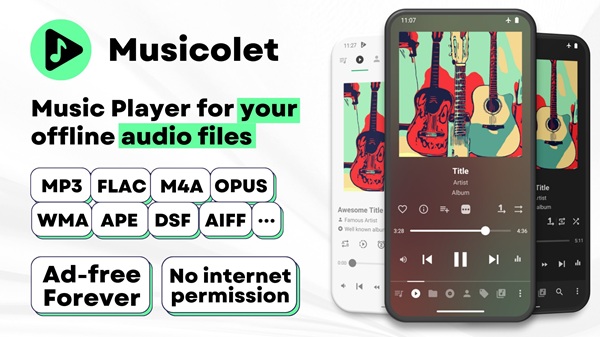
The app is built for local playback, so it works best with music files you already own and save on your device. It supports many common audio formats, including MP3, FLAC, AAC, ALAC, WMA, APE, and more. For users who do not care about streaming and only want a clean player for offline listening, this setup feels practical. You open the app, pick your music, and start listening without dealing with online recommendations or account logins.
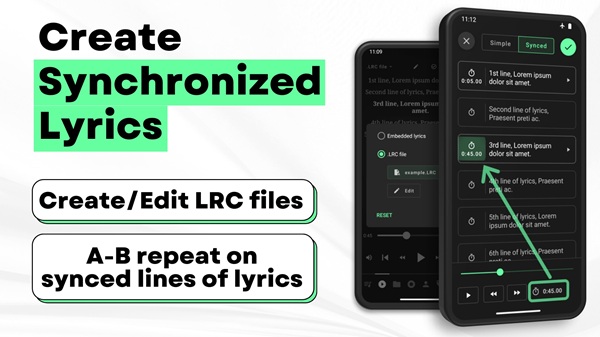
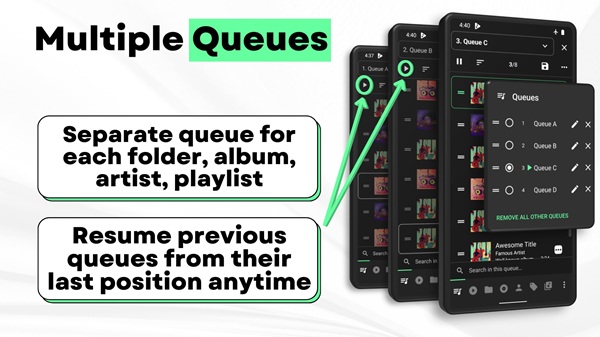
One of the strongest parts of Musicolet is how it organizes music. It offers folder browsing, playlist management, artist and album sections, and even multiple queues. That means you can keep one queue for workouts, another for study time, and another for late-night slow songs without messing up your current playback. Small features like bookmarks, notes, synced lyrics support, and tag editing also make it more useful for people who like to manage their library properly instead of leaving everything in one messy pile.
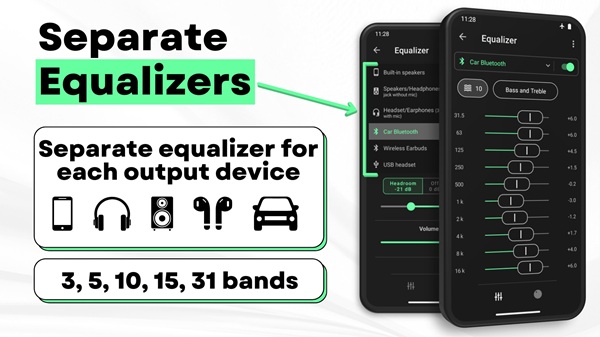
It also includes playback tools that matter in daily use. There is gapless playback for smoother album listening, equalizer controls for different output types, sleep timers, lock screen controls, widgets, and headset button support. Android Auto support is a nice touch for drivers who want easier access in the car. These features make the app feel designed for people who actually listen to music every day, not for people who tap one random song and forget about it two minutes later.
The main advantage is convenience. Musicolet keeps things offline, lightweight, and focused. It does not ask for internet permission, and it is known for being ad-free, which many users appreciate right away. The interface also keeps major sections easy to reach, so browsing your library feels faster than in many crowded music apps. For users with large collections stored in folders, this kind of layout can save a lot of time and a few mild headaches.
There are some limitations, and they matter. Musicolet does not stream music, search online tracks, or fetch lyrics automatically. You need to bring your own music files, and some extra features, like synced lyrics setup, may require manual work. For people who mainly use Spotify, YouTube Music, or cloud-based libraries, this app may feel too limited. The “MOD” version name can also raise trust and security concerns depending on where it comes from, so users should be careful with unofficial files.
This app suits listeners who want full control over offline music on Android. It is especially useful for people with downloaded songs, lossless audio collections, audiobook files, long playlists, or SD card storage. Students, commuters, drivers, and anyone with unreliable internet may find it especially handy. If your music taste lives in local folders instead of streaming apps, Musicolet makes a lot more sense than flashy players packed with features you may never use.
FAQs Musicolet Music Player
What is Musicolet Music Player MOD APK used for?
+
Musicolet Music Player MOD APK is used for playing local audio files stored on an Android phone or SD card. It helps users manage offline music with playlists, folders, queues, lyrics, and playback controls.
Does Musicolet Music Player MOD APK work without internet?
+
Yes. The app is designed for offline use and plays music files already saved on your device. It does not depend on internet access for normal playback.
Can Musicolet Music Player MOD APK stream songs online?
+
No. Musicolet is a local music player, so it does not stream, search, or download songs from online music services. You need to add your own audio files manually.
What features make Musicolet Music Player MOD APK useful?
+
Useful features include multiple queues, folder browsing, playlist support, tag editing, equalizer settings, synced lyrics support, sleep timers, lock screen controls, widgets, and Android Auto support.
Who should use Musicolet Music Player MOD APK?
+
It suits Android users who keep music files on their phones, want an offline player, and prefer organized playback without ads, streaming clutter, or constant internet use.
Discover More Interesting Apps
-

Songhub Karaoke
v3.0
37 MB
Updated -
TIDAL
v2.213.0
120.88 Mb
Updated -
Solfa
v1.2.0
26 MB
Updated -
Mod
ElevenLabs
v0.0.109
34.00 Mb
Updated -
Mod
Symfonium
v15.1.0 TV
39.59 Mb
Updated -
Mod
Smule
v13.2.1
38.02 Mb
Updated -
Mod
Qobuz
v10.1.2.0
47.15 Mb
Updated -
Mod
JioSaavn Pro
v10.10
45.11 Mb
Updated -
Mod
Tiktok You
v46.8.3
64 MB
Updated -
Mod
Audiomack
v8.10.0
80.39 Mb
Updated










Share Your Thoughts